• The move to the new server is done. There are some software and database maintenance updates in process. This has us passing the hat around to help out. We appreciate any donations. Seriously, even a dollar helps. The payment page may be found here - https://www.audiokarma.org/support.html

Laserology - CD Players and why they stop reading

Print it!
I've got a Denon DCD-1500 that just stopped playing, that's what brought me to this thread.
I bought it used years ago, it's HEAVY.
The weird thing about this one is that no sound comes out, but the display shows tracks changing and counting like everything's great!
 
Print it!
I've got a Denon DCD-1500 that just stopped playing, that's what brought me to this thread.
I bought it used years ago, it's HEAVY.
The weird thing about this one is that no sound comes out, but the display shows tracks changing and counting like everything's great!

Are you using the fixed or variable outputs?
If I recall correctly the 1500 defaults to zero volume on the variable outs on power up and you have to bring the volume up by remote.

If that's not applicable then maybe the DAC is not working.
I have a Cambridge Audio player that was doing this and Dr. Audio pointed me in this direction. I picked up an outboard DAC cheap and used the optical out.
It did have a faint humming sound from the analog output.
 
@gearhead That sounds like the laser is reading the disc fine, but the audio is failing somewhere.

That's what I thought

Are you using the fixed or variable outputs?
If I recall correctly the 1500 defaults to zero volume on the variable outs on power up and you have to bring the volume up by remote.

If that's not applicable then maybe the DAC is not working.
I have a Cambridge Audio player that was doing this and Dr. Audio pointed me in this direction. I picked up an outboard DAC cheap and used the optical out.
It did have a faint humming sound from the analog output.

I've always used the fixed outputs.
Trying an external DAC would be a good idea at this point

Many CDPs have an output relay or other muting function, intended to mask data errors. No sound in both channels could be due to a failure of this muting function.

That would probably be something I couldn't fix myself.
 
I'd be more likely to bring a component to an experienced technician, but it's helpful to know these possibilities.
 
On some of my CDs my CD player does not read TOC. On some other it shows number of tracks and full duration, but does not start playing. On about 2/3 other discs that I tried, it plays flawlessly. I was given advice on this forum regarding this, I haven't done anything about it yet, but it seems that the problem may be as simple as dirt at the end of the rails.

Between sewing oil, watch oil and motor oil, is there one that I should NEVER use? I have watch oil and motor oil, I don't have sewing oil.

I wonder, if the problem is with the rails, why it reads some discs, but not others? Isn't the TOC located at a fixed place?

Similarly, I have no problems with 20-year old scratched CD, but the player cannot read TOC on a shiny like new quality CD, so I don't think it is laser or lens?

I will start with cleaning the rails and the lens, but the player reading visibly crappy CDs and not reading like new ones is surprising.
 
Print it!
I've got a Denon DCD-1500 that just stopped playing, that's what brought me to this thread.
I bought it used years ago, it's HEAVY.
The weird thing about this one is that no sound comes out, but the display shows tracks changing and counting like everything's great!


I'm quite a bit late to the party, but my DCD 1500 had the same problem. Turns out the output jacks are connected to a circuit board inside and when the cables are connected multiple times the jacks flex on the board causing the connections to break. Had to resolder the connections some years back, but only the variable jacks work now so it must have happened again.

The variable jacks will work but the output volume will be really low. I have to use my remote volume control to increase volume to a normal level.
 
I'm quite a bit late to the party, but my DCD 1500 had the same problem. Turns out the output jacks are connected to a circuit board inside and when the cables are connected multiple times the jacks flex on the board causing the connections to break. Had to resolder the connections some years back, but only the variable jacks work now so it must have happened again.

The variable jacks will work but the output volume will be really low. I have to use my remote volume control to increase volume to a normal level.

It's not just Denons that are guilty of the issue you had. Most all CDPs are 40+ years new, and never had ANY maintenance.
Buy, beg, borrow or steal a Service Manual for your player.
New belts, a good cleaning and re-lubing will help things out, without fail.
Dig around Google and locate a vendor and roll in some new caps to replace the old ones that are showing signs of dying.
A VOM is needed, along with an interest in learning a touch of electric theory.
Test equipment doesn't cost like it did a few years ago.

99% of the time, you will be surprised at how a small touch of effort pays off. pc
 
This fragment deserves to be printed and framed:

"11. Lasers which die on players bought 2 weeks ago from E-Bay
If the otherwise excellent, pretty and valuable mint player starts having laser problems at the original owner, it will inevitably end up in the hands of the laser guru, who will turn up the power of laser emission. It may help the laser to read better TEMPORARILY.
Then the guru gives the player back to the owner and says: " well, I managed to help you, the bill is 200 Euro, but take my good expert advice and start looking for a new player. This one will not last long. Sell it quickly, while it still works okay.
Then the owner goes home, and he freaks out. Gee, if the adjustment costed me 200 Eu, how much is gonna be next time around, when the big un strikes ? So he puts it on ebay with a story attached about the uncle who passed away and while the nephew was cleaning up his house this cd player was found. (Funny that these houses always get cleaned by the nephews not sons or wifes) It was always well taken care of because the uncle was a music lover. He only listened to it occasionally - one opera CD every sunday after a mess. It is sold as it is, without warranty, because the young nephew is too busy to check it. "
That is how mint collectors players end up in the hands of happy new owners only to die 2 weeks later.
"


Applicable to almost any electronic/electric/mechanical used thing on sale on-line...
 
Yes, that 'scuse we hear time and again about laser diode "dying" is funny. I've owned / modded dozens of cdp's and dvd drives (home models, discmans, PC and laptop drives, portable and car units). Many were purch'd used (ebay, etc) and/or were pwr cycled thousands of times. And never once experienced a "dead" laser diode. But, then again, I'm not a smoker, treat my gear with respect, mostly use clean power (conditioning strip, etc); and when modding, replace with parts of high quality and/or upgrade the PSU or regs which minimizes voltage ripple, etc.
I have CDPs that are now close to 40 years old, still going strong. Maybe poor-built drives of today are not so good???
 
Most of the time the problem is need for lubrication, but I have replaced plenty of lasers over the years and it ALWAYS FIXES THE PROBLEM if the laser power is low.
 
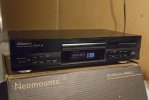
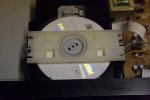
This 1998 Pioneer saved from the dump does not recognize the disc. But it does and plays when I press the clamp with my finger. The tray seems to be working normally, but maybe the mechanism doesn't lift up enough. Not even 1mm difference. The bearing would use some grease.

Pioneer PD-107 11.10.2023 #1.jpgPioneer PD-107 11.10.2023 #2.jpg
 
This 1998 Pioneer saved from the dump does not recognize the disc. But it does and plays when I press the clamp with my finger. The tray seems to be working normally, but maybe the mechanism doesn't lift up enough. Not even 1mm difference. The bearing would use some grease.

View attachment 3007338View attachment 3007339
What are you pressing, the magnet or the plastic support? Is the magnet rubbing against the support?
 
Back
Top Bottom