

You are using an out of date browser. It may not display this or other websites correctly.
You should upgrade or use an alternative browser.
You should upgrade or use an alternative browser.
Register to hide this ad

eljr
Koyaanisqatsi
I'm also interested in this as I just got an NAS and am setting it up.
How long is it you have JRiver?
eljr
Koyaanisqatsi
what is this about?
are you refering to the crazy leaning curve JRiver demands?
eljr
Koyaanisqatsi
I just unboxed the HAL M3 yesterday, so one day I guess?
I read this on another site, JRiver can be a bear.
"The main reason I chose Audirvana Plus over JRiver Media Center is I did not want to be forced to go through the steep learning curve for the JRiver."

ACHiPo
Active Member
Don't mean to be cryptic, just multi-tasking. 
I downloaded JRiver onto my desktop a few weeks ago and it seems pretty intuitive. Maybe not as good as my Aurender, but not bad. About 3 weeks ago I loaded a bunch of SACDs and other hi-rez files onto HDDs which exceed the capability of the Aurender, so I picked up a used HAL NAS with JRiver already installed. I've plugged in the HAL, but haven't hooked up a monitor/keyboard/mouse or the HDDs, so I haven't actually used JRiver to listen to music.
I'm anticipating a need to organize the albums (many of which don't have album artwork, etc. from the ripping process). Thus I'm hoping someone will weigh in on a good method to assign metadata and organize the media.

I downloaded JRiver onto my desktop a few weeks ago and it seems pretty intuitive. Maybe not as good as my Aurender, but not bad. About 3 weeks ago I loaded a bunch of SACDs and other hi-rez files onto HDDs which exceed the capability of the Aurender, so I picked up a used HAL NAS with JRiver already installed. I've plugged in the HAL, but haven't hooked up a monitor/keyboard/mouse or the HDDs, so I haven't actually used JRiver to listen to music.
I'm anticipating a need to organize the albums (many of which don't have album artwork, etc. from the ripping process). Thus I'm hoping someone will weigh in on a good method to assign metadata and organize the media.

robert_kc
Super Member
what is this about?
are you refering to the crazy leaning curve JRiver demands?
This winter I will acquire a new PC, and I will need to determine whether on not the Windows 10 native media player meets my needs, or if I'll need something like JRiver. I listen to classical music and opera, and I'm interested in reading about others' experience - e.g., how to tag for composer, orchestra, conductor, soloists, sub-genre, etc.
Hence,

robert_kc
Super Member
I loaded a bunch of SACDs and other hi-rez files onto HDDs
Am I correct that you copied the CD layer of SACDs onto a hard drive? (I'm not aware of a way to copy the SACD layer, or even play the SACD layer on a PC.)

KrisM
Lunatic Member
I can't speak for what he did, but SACDs can be copied. It requires a specific version of a Sony Playstation, and software. But it can be done.Am I correct that you copied the CD layer of SACDs onto a hard drive? (I'm not aware of a way to copy the SACD layer, or even play the SACD layer on a PC.)
I've downloaded SACDs in .iso form, and burned them to a disc. They worked on my Oppo, but not on my Sony and Marantz SACD capable players. Not sure if I ever tried to play them on my computer, though.
ACHiPo
Active Member
I had my SACDs ripped using the PS3 and put onto HDDs. I haven't been able to play the iso files via USB using my Oppo as a DAC, but I could play them on my PC using JRiver, which is why I decided to go that route.I can't speak for what he did, but SACDs can be copied. It requires a specific version of a Sony Playstation, and software. But it can be done.
I've downloaded SACDs in .iso form, and burned them to a disc. They worked on my Oppo, but not on my Sony and Marantz SACD capable players. Not sure if I ever tried to play them on my computer, though.
I'd also like to find a way to tag the ripped discs with cover art and liner notes. Does anyone know how to do that on a PC-based system?
Thanks,
AC
KrisM
Lunatic Member
Interesting. I burned the .iso files to DVD and they worked fine. I haven't thought of trying out a USB stick with those files, though. I think I will some day.I had my SACDs ripped using the PS3 and put onto HDDs. I haven't been able to play the iso files via USB using my Oppo as a DAC, but I could play them on my PC using JRiver, which is why I decided to go that route.
I'd also like to find a way to tag the ripped discs with cover art and liner notes. Does anyone know how to do that on a PC-based system?
Thanks,
AC
Can't help with the tagging thing. I'm still getting my head around properly tagging regular FLAC files.
My gut tells me there would be no way to do it. Those .iso files are an exact image of the SACDs, and can't be edited as far as I know. Which isn't much, though, so take that comment with a heaping amount salt, lol.

sKiZo
Hates received: 92644 43.20°N 85.50°W
I rip the stereo layer of an SACD to the hard drive, and play the multi-channel on the Oppo. Not worth the hoops Sony would make me jump through otherwise.
About the jRiver learning curve ... it's only as complicated as you want it to be. The front end interface is real straight forward, but as you'd expect, some of the more esoteric features may take some thought. Thing is, it's got a LOT of those - I figure if MC can't do it, it doesn't need to be done!
Good example is ripping. Insert a disc, click rip. Then ... well ... that's pretty much it. You tell it what format you want ONCE, and it rips the tracks, converts them using EAC (included in the package) analyzes the audio, and goes out to the internet to fill in the tags and add cover art. It will also update any existing lists to organize your library for better access.
Does that sound complicated?
I DO use some of the program's more advanced features, and agree, those could be better implemented. My favorite is the "convolution engine" which allows me to load up a filter list (created using Room EQ Wizard and a calibrated mike) to EQ the system. That also is a one time thing, and the payoff is well worth the effort to ... like ... RTFM.
I've also got some "advanced" type custom lists for organizing special collections like the Decca Sound, Mercury box sets, and such. Those just need a logical approach to how you filter and display the music.
This is what Toscanini's NBC collection looks like on the hard drive:

And this is what I see on the MC screen (And yes, I've manually edited the track titles. You'd be amazed how often classical collections exceed the 256 character limit for a file name. This gives me exactly what I want to see, and can be done on the fly once the music's been imported:
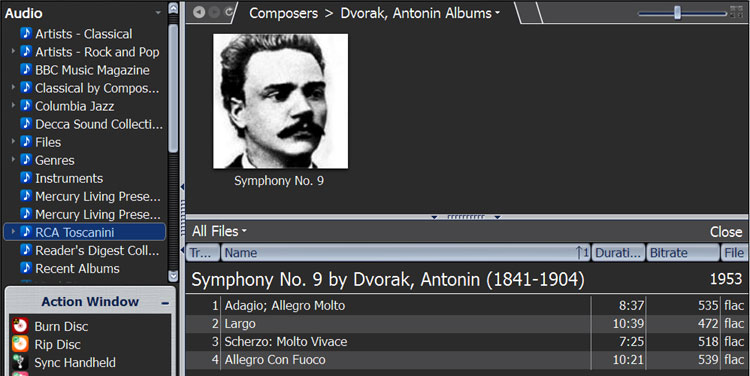
In the left pane, you can see some of my other collections. I never have to look at Windows Explorer again. These tracks will also appear automatically in various other playlists as determined by genre and other appropriate tags. Software also has a really decent search engine for digging deep and hard if you've a mind to.
Want lyrics?

Still whining on jRiver's forum about automatically importing those and rolling them like karioke, but hey, it ain't a perfect world ... ;-}
So anyway ... call me a fanboy. <G>
About the jRiver learning curve ... it's only as complicated as you want it to be. The front end interface is real straight forward, but as you'd expect, some of the more esoteric features may take some thought. Thing is, it's got a LOT of those - I figure if MC can't do it, it doesn't need to be done!
Good example is ripping. Insert a disc, click rip. Then ... well ... that's pretty much it. You tell it what format you want ONCE, and it rips the tracks, converts them using EAC (included in the package) analyzes the audio, and goes out to the internet to fill in the tags and add cover art. It will also update any existing lists to organize your library for better access.
Does that sound complicated?
I DO use some of the program's more advanced features, and agree, those could be better implemented. My favorite is the "convolution engine" which allows me to load up a filter list (created using Room EQ Wizard and a calibrated mike) to EQ the system. That also is a one time thing, and the payoff is well worth the effort to ... like ... RTFM.
I've also got some "advanced" type custom lists for organizing special collections like the Decca Sound, Mercury box sets, and such. Those just need a logical approach to how you filter and display the music.
This is what Toscanini's NBC collection looks like on the hard drive:
And this is what I see on the MC screen (And yes, I've manually edited the track titles. You'd be amazed how often classical collections exceed the 256 character limit for a file name. This gives me exactly what I want to see, and can be done on the fly once the music's been imported:
In the left pane, you can see some of my other collections. I never have to look at Windows Explorer again. These tracks will also appear automatically in various other playlists as determined by genre and other appropriate tags. Software also has a really decent search engine for digging deep and hard if you've a mind to.
Want lyrics?
Still whining on jRiver's forum about automatically importing those and rolling them like karioke, but hey, it ain't a perfect world ... ;-}
So anyway ... call me a fanboy. <G>
ACHiPo
Active Member
Great info! Thanks!
eljr
Koyaanisqatsi
That is all well and good but Audirvana is only on the MAC - so your point is a non-issue.
I think the point was that the JRiver learning curve can be a bear.
eljr
Koyaanisqatsi
I rip the stereo layer of an SACD to the hard drive, and play the multi-channel on the Oppo. Not worth the hoops Sony would make me jump through otherwise.
I do the same.I simply play the SACD layers when I feel like it on the SACD players I have.
About the jRiver learning curve ... it's only as complicated as you want it to be. The front end interface is real straight forward, but as you'd expect, some of the more esoteric features may take some thought. Thing is, it's got a LOT of those - I figure if MC can't do it, it doesn't need to be done!
I have had JRiver for 18 months and it's been a monster for me. From the known issues with DLNA and OPPO/Jriver to how to enter multi discs without have tract 1 play from all 3 discs one after another to all track 2's to all track 3's...
I am just at the stage, after 18 months where I can worry about enjoying some of the features that I never looked at before because of all the confusion.
Good example is ripping. Insert a disc, click rip. Then ... well ... that's pretty much it.
Each disc it seems needs attention in my experience.
Does that sound complicated?
not the way you tell it....... lol.... I think had I done streaming previous it would not have been so difficult for me.
I can't imagine a casual listener using JRiver with any degree of success.
And this is what I see on the MC screen (And yes, I've manually edited the track titles. You'd be amazed how often classical collections exceed the 256 character limit for a file name.
and how does a dumb slob like me know something like this?
This was yet another JRiver implementation challenge I faced be it a Windows short coming or not. It only added to the "experience."
I was definitely someone who needed tutelage and that was the real issue. No one at JRiver to take ownership of issues that could sink a newbie. I read a few places on the web some very upset people because of this. People like me who really worked to make it work. Heck, I even hired an electrician to hard wire everything when my original intent was to stream wireless.
I honestly feel all that is finally behind me and I am at the stage where I can actually start to enjoy it. Hence the thread.
BTW, nice post. Clearly my lack of technical experience and inability to decipher Wikipedia tutorials made my experience more...
challenging.

sKiZo
Hates received: 92644 43.20°N 85.50°W
Maybe a new field for me ... jRiver consultant ...
$70 an hour sounds about right ... double that if you "help" ... <G>
PS ... whatever you go with, Windows users, DO upgrade to at least W8. Latest versions of the WASAPI sound engine run rings around the older stuff, and are rated as next best thing to bit perfect. I know it made a world of difference in what I was hearing, and no more "buffering" or other strangeness, and no proprietary drivers that can drive ya nutz. System seems quite bulletproof in fact ...
$70 an hour sounds about right ... double that if you "help" ... <G>
PS ... whatever you go with, Windows users, DO upgrade to at least W8. Latest versions of the WASAPI sound engine run rings around the older stuff, and are rated as next best thing to bit perfect. I know it made a world of difference in what I was hearing, and no more "buffering" or other strangeness, and no proprietary drivers that can drive ya nutz. System seems quite bulletproof in fact ...
KrisM
Lunatic Member
You're not alone on JRiver, eljr. I tried it out about a year ago, and it wasn't for me.
I'm at a place where I've got EAC set up (almost) perfectly for my needs, and use FileBrowser for playback. FB is waaaaay primitive compared to most other players, but I don't care right now. I look for the folder where an album is, and play it. Even if the tagging is a mess, as long as the folder is labelled to my liking I can find it and play it. Done.
I realize others want more options than this though, so it's all cool.
I'm at a place where I've got EAC set up (almost) perfectly for my needs, and use FileBrowser for playback. FB is waaaaay primitive compared to most other players, but I don't care right now. I look for the folder where an album is, and play it. Even if the tagging is a mess, as long as the folder is labelled to my liking I can find it and play it. Done.
I realize others want more options than this though, so it's all cool.
sKiZo
Hates received: 92644 43.20°N 85.50°W
Might help that I came over to jRiver from XP Media Center ... keeping that running was about as difficult as keeping a smile on your face while you slam your (insert body part here) in a drawer ...
Then again, I'm still on MC v19 ... it might have gotten more complicated since then. No need to upgrade, as it's doing everything I want it to as is.
PS ... worth mentioning, I started out with v15 ... every upgrade has been pretty much seamless, and that's a good thing.
Then again, I'm still on MC v19 ... it might have gotten more complicated since then. No need to upgrade, as it's doing everything I want it to as is.
PS ... worth mentioning, I started out with v15 ... every upgrade has been pretty much seamless, and that's a good thing.


