

You are using an out of date browser. It may not display this or other websites correctly.
You should upgrade or use an alternative browser.
You should upgrade or use an alternative browser.

guitarman50
Super Member
I read this on another site, JRiver can be a bear.
"The main reason I chose Audirvana Plus over JRiver Media Center is I did not want to be forced to go through the steep learning curve for the JRiver."
I chose jriver because of how easy it was. I didn't really find a steep learning curve at all. Theres a lot you can do in it but I find it intuitive and easy to use. I'm still using MC17 as I hate paying to upgrade every few months.

eljr
Koyaanisqatsi
I chose jriver because of how easy it was. I didn't really find a steep learning curve at all. Theres a lot you can do in it but I find it intuitive and easy to use. I'm still using MC17 as I hate paying to upgrade every few months.
Great!
Then tell me why, on occasion cover art wont load and you have that damned music note that won't leave?
Thanks
guitarman50
Super Member
Great!
Then tell me why, on occasion cover art wont load and you have that damned music note that won't leave?
Thanks
I've never ever had an issue with that. If the cover art didn't automatically load from the Internet I simply went to the Internet my self and downloaded the cover image, put it in the folder with the music files then chose "Add from File" Every one of my few hundred digital albums have a cover.
Now take itunes. There are times when no matter what I do for some reason I can't get the cover art to load.
eljr
Koyaanisqatsi
I've never ever had an issue with that. If the cover art didn't automatically load from the Internet I simply went to the Internet my self and downloaded the cover image, put it in the folder with the music files then chose "Add from File" Every one of my few hundred digital albums have a cover.
Now take itunes. There are times when no matter what I do for some reason I can't get the cover art to load.
I had to delete the album completely from my hard drive and rip it anew. Then it accepted the cover art from file.
I can't stand no cover art, I'd rather not have the music in my library. One way or another I have gotten cover art on everything but sometimes it has taken months.
So no idea on what causes JRiver to accept cover art from file or URL?
Understanding the why would lead to less aggravation.
Thanks for the comment.
You say you place the cover art in the album folder in windows music? Good idea, I have simply downloaded the art to the desktop or just left it in the download file, applied it and then deleted it. I never thought to permanently house it in the music folder. Good idea. (please confirm I understood you correctly, thanks again)
guitarman50
Super Member
Yes I do place the cover art in the same folder as the music is located simply for organizational purposes. I can't imagine it makes a difference. When you chose cover art from file it should recognize the path no matter where its stored but then I don't know as I've always placed the cover art file in the same folder as the music files for the corresponding album.
I am using MC17. Not sure which version you are using but maybe if its a different version that particular version has an issue with cover art. The jriver forum is a good place to post a question to see if you can solve it.
As I said before I have your same particular problem with itunes and can't seem to figure it out. Of course I don't really use itunes that much and haven't tried very hard to figure it out. I only use itunes to load music on to my iphone.
I am using MC17. Not sure which version you are using but maybe if its a different version that particular version has an issue with cover art. The jriver forum is a good place to post a question to see if you can solve it.
As I said before I have your same particular problem with itunes and can't seem to figure it out. Of course I don't really use itunes that much and haven't tried very hard to figure it out. I only use itunes to load music on to my iphone.
eljr
Koyaanisqatsi
Of course I don't really use itunes that much and haven't tried very hard to figure it out. I only use itunes to load music on to my iphone.
I refuse to use anything Apple.
eljr
Koyaanisqatsi
For today's adventure, JRiver told me my trial period was up and would not open. After 2 years.
Anyway,
I fished out the code which it told me was no good.
I tried a second time and it gave me another message but still rejected it.
Finally I restarted my PC then when I went to open Jriver it again told me my trial was over. However, thankfully, this time it took the code.
WTF?
All the time it's something.
Two days ago when I turned it on, two albums were separated. Some songs on one album, some on the other. One of the two was separated into 3 albums. They could not be emerged back to one. I had to delete them and rip them anew.
and of course a few days ago, a handful of albums just dropped the date.
I wouldn't ever think of tagging my classical music the way I'd like for fear of what I might hit to scramble everything.
The far and away most frustrating piece of audio I have ever used... in over 50 years. More time spent getting it to work than I spent getting all my other systems together, wiring, connecting moving....
Sorry, I had to vent.
any things I can guard against that keep causing these things?
It's got to be some kind of interplay between my PC and Jriver, but why, how?
Anyway,
I fished out the code which it told me was no good.
I tried a second time and it gave me another message but still rejected it.
Finally I restarted my PC then when I went to open Jriver it again told me my trial was over. However, thankfully, this time it took the code.
WTF?
All the time it's something.
Two days ago when I turned it on, two albums were separated. Some songs on one album, some on the other. One of the two was separated into 3 albums. They could not be emerged back to one. I had to delete them and rip them anew.
and of course a few days ago, a handful of albums just dropped the date.
I wouldn't ever think of tagging my classical music the way I'd like for fear of what I might hit to scramble everything.
The far and away most frustrating piece of audio I have ever used... in over 50 years. More time spent getting it to work than I spent getting all my other systems together, wiring, connecting moving....
Sorry, I had to vent.
any things I can guard against that keep causing these things?
It's got to be some kind of interplay between my PC and Jriver, but why, how?
eljr
Koyaanisqatsi
itunes is gross. I can't even get it to work on my old Vista equipped laptop.
But playing FLAC through my Apple(NOT a fanboy, btw) devices is a breeze. And I have never had an issue with cover art tags when ripping stuff with EAC.
I need a Flac player for a Apple lap top. Which do you recommend?

KrisM
Lunatic Member
I'm not up on Apple computers(I'm a Windows guy, I guess), but I use the FileBrowser app on my iphones/ipads/ipod a lot touch for FLAC playback.I need a Flac player for a Apple lap top. Which do you recommend?
It's waaaaaay dumb'd down compared to all of the other options out there, but it works for me. I click on the app, and all of the folders that I've created on my "music hard drive" that is plugged into my router are visible, and easily playable.
I really do want to be able to take advantage of what the other playback program options offer, but I grew weary of dealing with issues when all I just wanted to listen to music. FileBrowser lets me just start an album, and then listen.
I think the company that developed it is called Stratispherix(?). I also bought their music player app, but haven't really played with it much, yet. I'm really more of a "put on an album and listen to the whole thing" kinda guy for the most part. FB makes that work for me.
Anyway, I'm not sure if there's a Mac version of FB, but there is a free version to try out with portable devices. It only gives you about 15 seconds per song, but gives you an idea if the app will work for you. And then the paid version is cheap, about $7 I think. My paid version is working on 4 different devices right now.

KrisM
Lunatic Member
That **** drives me crazy.He's what should be simple question, how do you keep the tracks to an album in order?
I set them in redder then as soon as I exit... bam they go back to out of order.
Why are they out of order in the first place?
A few years ago I tried out stuff like jriver(and others) to rip to FLAC, and I couldn't get it straight. I finally found an EAC tutorial online that got me straightened out, and that's how I roll now.
I know it's all how it's configured(EAC, jriver, etc) but I find it complicated.
eljr
Koyaanisqatsi
That **** drives me crazy.
A few years ago I tried out stuff like jriver(and others) to rip to FLAC, and I couldn't get it straight. I finally found an EAC tutorial online that got me straightened out, and that's how I roll now.
I know it's all how it's configured(EAC, jriver, etc) but I find it complicated.
here is the funny thing, it can't be complicated, it has to be straight logic, a flow chart. It's gets stupid because there is no way for us to know the details of the flow chart. Too many options are killing JRiver. You can do amazing things with it IF YOU KNOW HOW, but if not you can struggle at entry level.
KrisM
Lunatic Member
Truehere is the funny thing, it can't be complicated, it has to be straight logic, a flow chart. It's gets stupid because there is no way for us to know the details of the flow chart. Too many options are killing JRiver. You can do amazing things with it IF YOU KNOW HOW, but if not you can struggle at entry level.
.
I know that EAC has a crazy amount of options, and I don't have a clue how to work with them. I'm just happy that I found a way to get it straight(for me), and don't have to worry about it anymore.
eljr
Koyaanisqatsi
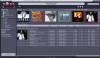
This is making me crazy, The tracks are not in order. I can easily put them in order by clicking on Tracks> sort inside groups by track # but it won't stick.
and it will not play in order if I play the album.
This has got to be a simple fix, can anyone share how it's done?
Why are these tracks out of order in the first place?

eljr
Koyaanisqatsi
Hover the curser on the down arrow on tab "Albums" - or right click on the area to the right of the tab - check what it shows on "Sort By". (Default) seems to be track number...
Hope this is it - otherwise I can't be much help.
thanks
nope


