• The move to the new server is done. There are some software and database maintenance updates in process. This has us passing the hat around to help out. We appreciate any donations. Seriously, even a dollar helps. The payment page may be found here - https://www.audiokarma.org/support.html

Organizing your music in JRiver

JRiver is as hard as you make it out to be - just like anything else. It hasn't been that hard. There are videos one can get that show how to set it up. It took me about 5-10 minutes to figure out how to use it.

If you can use any other program like Windows Media Player, JRiver is in the same general boat. Here is a general guide for setup - http://assassinhtpcblog.com/jriversetup/

Foobar is much harder to use than JRiver ever will because everything is built into JRiver and Foobar needs to have plugins, plugins and more plugins.

Clearly you are a much brighter man than I, you accomplished in 10 minutes what took me 18 months.

Windows Media Player I never devoted a minute to learning, it is just that user friendly. I think that is why I was so surprised by JRiver.

I certainly respect your opinion and experience, no correlation to mine however.
 
Might help that I came over to jRiver from XP Media Center ... keeping that running was about as difficult as keeping a smile on your face while you slam your (insert body part here) in a drawer ...

Then again, I'm still on MC v19 ... it might have gotten more complicated since then. No need to upgrade, as it's doing everything I want it to as is.

PS ... worth mentioning, I started out with v15 ... every upgrade has been pretty much seamless, and that's a good thing.

Nah, I started on 18. Not sure why some find it so challenging and others not.

(Upgrades never a problem, even with windows 10 coming out))
I do know that I am gonna love it as I have passed the "hump" . I just need to figure the best way to tag the classical stuff. :beerchug:
 
speaking of JRiver, my latest challenge.

When I use two zones simultaneously I have drop outs. When they occur the JRiver screen shifts to the left then snaps back as it did when I had other issues, thankfully resolved.

I am running the last version of Media Center 20, the operating system is Windows 10. One zone is a Dell with the central Media Center and library the other an Oppo 105.

All is hard wired.

Both zones play flawlessly when not in two zone mode.

I have no clue how to trouble shoot.

Advice?
 
It seems the Oppo needs to be connected via USB to prevent many issues.......


good point

My Server, MC, is on my Dell lap top which is hard wired to the router, the router is hard wired to the OPPO. Both via, Ethernet cable.
 
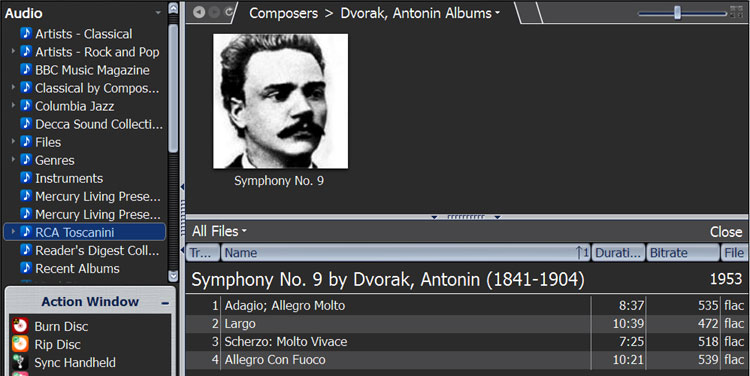
And this is what I see on the MC screen (And yes, I've manually edited the track titles. You'd be amazed how often classical collections exceed the 256 character limit for a file name. This gives me exactly what I want to see, and can be done on the fly once the music's been imported:

mc-folders02.jpg


In the left pane, you can see some of my other collections. I never have to look at Windows Explorer again. These tracks will also appear automatically in various other playlists as determined by genre and other appropriate tags. Software also has a really decent search engine for digging deep and hard if you've a mind to.


So how do I create the folders that I see you have. (Living Presence, Decca Sound Collection, Reader Digest Club....
How do I code the album so it goes to that folder?

How does that interfere with my master view which I have set by date of release?
 
I'm still in the trial period for JRiver, it seems about like using any other media software. I think XBMC was harder for me, but I don't use any of the advanced features like ripping SACD or different zones or cataloging by label. As far as just playing my collection on the PC, I think it's fine.

I ripped a bunch of CDs as uncompressed .wav using Windows Media Player and some of those tracks within an album would be tagged "unknown artist" and labeled "unknown" instead of the song title, usually track 1. Wasn't a big deal to play them, but JRiver put all the unknowns out on their own - the metadata was in the file extension, but I had to re-tag a couple dozen songs to get them back in their albums. And JRiver was great about finding cover art, missed a couple, mis-labeled a couple, but all in all not bad.

I haven't ripped any CDs with it yet, but I just bought a bunch that I'll need to rip, so I'll give that a whirl in a few days.
 
So how do I create the folders that I see you have. (Living Presence, Decca Sound Collection, Reader Digest Club....

Lots of different ways to organize, and don't forget ... I'm Polish ... my mind works in strange and mysterious ways! <G>

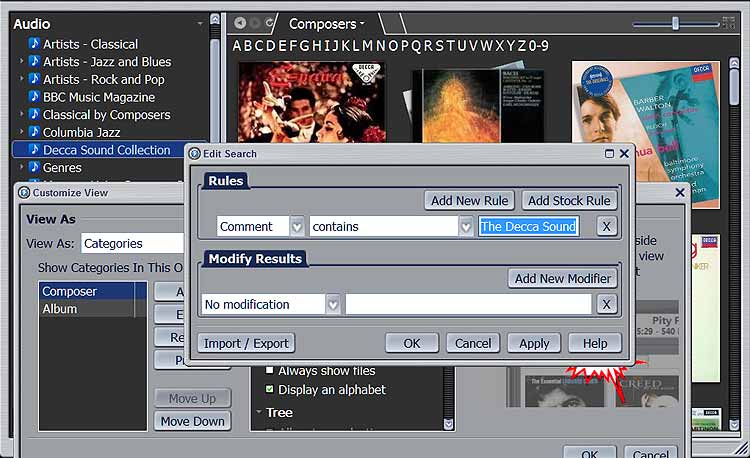
Anyway ... here's some samples. Nothing fancy, and most (if not all) of my folders are built the same way. Decca Sound is the basic template ... that was the first one I did here. Right click on the AUDIO folder and create and name a new view ... I've already at this point added a COMMENT tag for the collection as I rip each CD.

mc-decca-sound.jpg


Turn on "display an alphabet" and sort A-Z by Composer. Done!

The Mercury collections are similar ...

mc-mlp-collection.jpg


One thing I did with those was modify the comments to include the individual CD numbers as I ripped the disks. The "rule" in this case just gives the "MLP1 - CD" so it catches all the CDs in that collection. "MLP2 - CD" is of course used for the second collection.

Toscanini is the same, only that's got composers scattered all over the disks. Instead of album covers, I downloaded generic pics of the composers for the library. Works for me anyway. Here's where I got the pics ...

https://www.sfcv.org/learn/composer-gallery?page=1

I'm sure you'll find better ways to handle things, as each collection is unique.

How does that interfere with my master view which I have set by date of release?

Custom folders won't interfere with any other views you may use or have created. One of the benefits of MC is there's many ways to find and organize the same album. One peg ... many holes. There's also the universal search if all else fails.

Have fun with it!
 
I don't use any of the advanced features like ripping SACD or different zones or cataloging by label. As far as just playing my collection on the PC, I think it's fine.

One of the pleasures of the package ... it's as complicated as you want to make it. Basic playback is easy.

I ripped a bunch of CDs as uncompressed .wav using Windows Media Player and some of those tracks within an album would be tagged "unknown artist" and labeled "unknown" instead of the song title, usually track 1. JRiver was great about finding cover art, missed a couple, mis-labeled a couple, but all in all not bad.

Don't think you can blame that on jRiver ... the online databases are "volunteer" like a wiki, and we're not all perfect. I'd say tagging isn't any worse than any other program using lookup. One thing I'd consider is converting your collection to FLAC ... that's also uncompressed, but stores tags internally. WAV uses a "sidecar" file that can get lost or separated. That happens, and you need to manually enter at least the album name, artist, and track name for EACH file to get it working again. I've got tens of thousands of files here and that would be ... painful.

I haven't ripped any CDs with it yet, but I just bought a bunch that I'll need to rip, so I'll give that a whirl in a few days.

Ripping is easy ... fire up jRiver, insert disk, and click RIP when it pops up. Make sure you're online, and it'll automatically do your lookups. You can also preset the defaults for file format, and have it set to do all the analysis at the same time for volume leveling and such. It uses EAC Lite as a ripping engine, and it don't get no better than that. Not as many bells and whistles as the full EAC package, but can't say I've ever needed them.

Speaking of which ... for me, MC was a one time investment as well ... v19 does everything I want it to do. I think they're on 21 or 22 now, but I haven't seen any new features in the "gotta have" category for my purposes. The license also allows unlimited installs on one license - I've got another machine set up as a video server as well.
 
OK, ripping my first CD. Had to do-over, got .ape file on my local drive the first time around :D Shooting for flac on my NAS this time.
And getting the file format down, it sorted alphabetically instead of by track - third time a charm?

Bingo! Off to the races!

One thing I like: It found the Artist's folder on the NAS automatically and put the new album in there. Before, I'd have to open the artist and copy the album over to that folder, or the album would end up in the root directory. Handy.
 
Last edited:
OK, ripping my first CD. Had to do-over, got .ape file on my local drive the first time around :D Shooting for flac on my NAS this time.

And getting the file format down, it sorted alphabetically instead of by track - third time a charm?

Bingo! Off to the races!

One thing I like: It found the Artist's folder on the NAS automatically and put the new album in there. Before, I'd have to open the artist and copy the album over to that folder, or the album would end up in the root directory. Handy.


don't feel bad, I have been using it 18 months and it took me over an hour today to get one download in properly today.

It's a bear, no two ways about it.
 
Last edited:
Lots of different ways to organize, and don't forget ... I'm Polish ... my mind works in strange and mysterious ways! <G>

Anyway ... here's some samples. Nothing fancy, and most (if not all) of my folders are built the same way. Decca Sound is the basic template ... that was the first one I did here. Right click on the AUDIO folder and create and name a new view ... I've already at this point added a COMMENT tag for the collection as I rip each CD.

mc-decca-sound.jpg


Turn on "display an alphabet" and sort A-Z by Composer. Done!

The Mercury collections are similar ...

mc-mlp-collection.jpg


One thing I did with those was modify the comments to include the individual CD numbers as I ripped the disks. The "rule" in this case just gives the "MLP1 - CD" so it catches all the CDs in that collection. "MLP2 - CD" is of course used for the second collection.

Toscanini is the same, only that's got composers scattered all over the disks. Instead of album covers, I downloaded generic pics of the composers for the library. Works for me anyway. Here's where I got the pics ...

https://www.sfcv.org/learn/composer-gallery?page=1

I'm sure you'll find better ways to handle things, as each collection is unique.


Custom folders won't interfere with any other views you may use or have created. One of the benefits of MC is there's many ways to find and organize the same album. One peg ... many holes. There's also the universal search if all else fails.

Have fun with it!


appreciate it, I'll read this up close and experiment when I have time then shoot back more questions.
 
As long as it remembers the settings I put in, I'm good to go.

Yeah, this is working great. I wish it'd delete the previous ripped files from the queue automatically, there might be a setting for that. Other than that, it's rocking.
 
Last edited:
alright, I created the folder from "empty view" but it put all kinds of stuff in it. I had to delet the folder, it was not what I wanted at all.

Do I need to tag the albums in some way? I can just drag and drop like user friendly windows?
 
all i want to do is get all my Virtuoso albums in one feakin' folder, then by date.

JRiver may be great but it's a monster to learn. At least for me. Guess my genius test scores are no match for JRiver. :no:
 
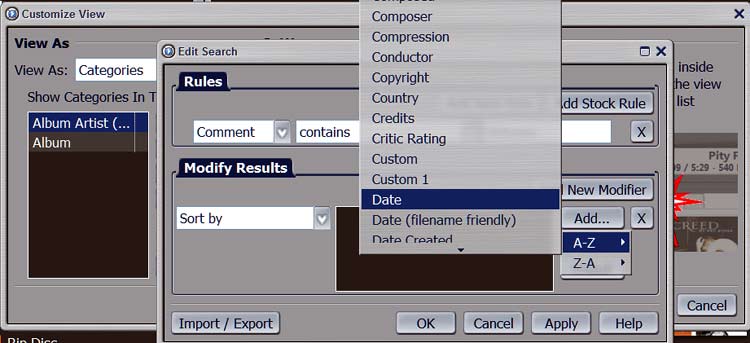
Click on TAG in the ACTION window, then scroll to comments and add "Virtuoso" to every album you want in the list. Here's the settings for the custom view that should work for you and capture all the albums you've tagged.

mc_virtuoso.jpg


Any other custom views, same thing, only different. Only tricky bit is when you "modify results" click ADD and hover the mouse pointer over A-Z ... the list of fields you can use will pop up, then scroll to whatever you wish to use. In this case, you'll end up with all the Virtuoso tagged albums listed in chronological order, assUming they're also date tagged properly. You'll also still find the albums in any other views you could find them in before.

Once you've got the basic view working right, you can TAG individual files or albums for additional information (like lyrics, orchestra, etc.) on the fly, even during play.

Something like this is where MC's custom views shine for me. I think I've mentioned this before, but I seldom change the original filenames and such ... I do most of my tag editing in MC, which stores it's own tag information in an internal database and doesn't change what your operating system sees. Example ... here's what part of the Toscannini box set looks like in Windows Explorer:

mc-folders01.jpg


I broke my own rule here by renaming the 70+ disks from the ungainly long names used when they were created. As you can see, there's three different composers on one disk. MC sorts those out in my custom "composers" view seen here:

mc-folders02.jpg


As you can see, I've edited the track names using MC's TAG feature, which stores them in it's own internal database without changing the file name. I also edited the album names, so each shows up (and plays) on it's own. Each track name is edited individually of course, but any info common to a bunch of tracks (like album name for instance) can be done all at once using the old SHIFT-CLICK thing which selects all the tracks you want to edit. In this case, once I changed the album names to separate them out from the disk, I can just click the album cover and edit the tags for all the tracks on that album. As far as differences between what MC and Windows see ... who cares? I'll probably never look at them in Explorer again.

DO backup your library every now and then, especially if you make any major changes like adding views or a whole bunch of media. MC will do timed interval backups automatically by default as well.

PS ... Don't feel bad. I used to be a rocket scientist and ran into the occasional head scratcher, but it was worth the effort. ;-}
 
Last edited:
OK, but wait. If I read you correctly and it makes sense, my first step is to back up JRiver.

The fear of everything going to hell has indeed kept me from experimenting. So that is what I need to learn first.

I'll follow their Wiki page on this.

I am a bit confused, does not JRiver do an automatic backup every two days or so? (it's what I read)

Are you suggesting it should be done daily?
 
I had my SACDs ripped using the PS3 and put onto HDDs. I haven't been able to play the iso files via USB using my Oppo as a DAC, but I could play them on my PC using JRiver, which is why I decided to go that route.

I'd also like to find a way to tag the ripped discs with cover art and liner notes. Does anyone know how to do that on a PC-based system?

If you google "teds sacd ripping guide" you'll find instruction for converting the ISO file to individual DSF song files. DSF can be tagged, and played on equipment/software that supports DSD playback.
 
Thanks. I realize it's been a while since I provided an update. I did figure out how to convert .iso files to .dsf files, but I've figured out a few other things so it's not required.

Things are working ok now. My two 5 TB hard drives of media are connected to a HAL MS-3 server. The HAL is running JRiver and TeamViewer, and connected to my wireless network. My desktop computer also runs TeamViewer, from which I can remotely control the HAL. I'm not running the HAL headless, as I still occasionally have issues that require a monitor, keyboard, and mouse on the HAL to fix. I'm thinking about getting a touch screen monitor so I can get rid of the mouse and keyboard, which will also give me a couple more USB ports I can use for HDDs if I want to add my classical music.

The song titles show up in JRiver once I double-click on the .iso file. Some folks claim that .iso files sound better than .dsf files--I haven't done any critical listening to determine if that's the case, but it's a lot less hassle to not have to convert the files, so I've only converted a few.

The UI is not nearly as nice as the Aurender, but in every other way I like the HAL and JRiver set up better.

The one remaining big thing I'd like to resolve is how to get JRemote working on my iPad, which may close the UI gap a bit. Any guidance there would be appreciated.
 
OK, but wait. If I read you correctly and it makes sense, my first step is to back up JRiver. The fear of everything going to hell has indeed kept me from experimenting. So that is what I need to learn first. I'll follow their Wiki page on this. I am a bit confused, does not JRiver do an automatic backup every two days or so? (it's what I read) Are you suggesting it should be done daily?

Yes, first step is to backup when you get everything the way you want it, or in this case, make any major changes like adding new views you don't want to lose. Now is the time to have it all go to hell, instead of later anyway, right? <G>

No on the daily backup. I forget what time interval MC uses for it's automatic backups - supposed to be every two days. I did edit my system to store them in a folder on the data drive, and that seems to have broken the automatic backup option for me. No biggie, as I manually do a backup any time I change the library. No need to run the MC backup utility otherwise.

Here's the wiki on backup. The wiki is your friend.
https://wiki.jriver.com/index.php/Library_Backup

Note on the data drive ... I have all my software on a solid state drive for speed. All my music is on a standard two gig drive. The MC backup feature does NOT back up music files, only the library, views, and MC's options. I run incremental backups on the music drive using Acronis True Image. I also clone both drives maybe annually and stash those in a fire safe.

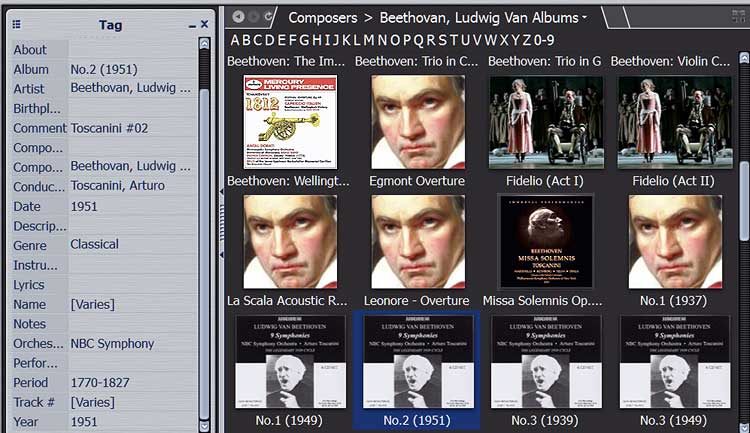
One other tip ... classical collectors especially will run into many different versions of the same work. I just edit the album name to include the production date. That's worked for me so far (with a few exceptions). You can see here there's three different variations in the Toscanini collection alone, and if you were to scroll down, you'd find several others from other albums and collections. Click on an album cover while viewing what's in your collection and you can see more info in the tag window to help you decide what you want to hear.

mc_toscanini.jpg


PS ... if you'll remember, the Toscanini custom view I built pulled the albums listed based on "Toscanini" being contained in the comment field. You can see here, I still identify each disk separately, but MC is smart enough to ignore the number.
 
Back
Top Bottom