

You are using an out of date browser. It may not display this or other websites correctly.
You should upgrade or use an alternative browser.
You should upgrade or use an alternative browser.

KrisM
Lunatic Member
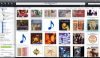
Those tracks with the music note, are they your own rips?How about this recurring problem.....
why can I sometimes not add artwork?
How to fix this?
View attachment 728729
As I've mentioned I use EAC, and every so often a track will rip to WAV just fine, but the conversion to FLAC doesn't happen. So, instead of seeing cover art with each track it shows up without it.
I'm probably the last guy to answer this. I'm not too hip with tagging programs, and I have EAC set for my liking. But I do have dbpoweramp on my computer, and when I right click a track I get an option to edit tags. I don't do it often, but it works.
MP3Tag is the program that always gets mentioned as far as tagging goes. I had issues with it (mostly likely user issues, lol)when I first tried it out, and haven't gotten back to yet.
KrisM
Lunatic Member
That stuff looks like Greek to me, lol!
Was the OP's original question (post #1) ever answered? If so I never found it. I read through this thread, which seemed to consist mostly of venting about how JRiver is too hard and thus few answers seemed to surface as the subject kept getting yanked around. I think this could have been an extremely beneficial thread for us JRiver users. Too bad. Hopefully another thread on JRiver will emerge that will stick to the subject of solutions to all the different ways to make this software work for us, many no doubt in ways we had never considered before.
I am convinced that simple software while easy to use is incapable of doing much. Complex (robust) software will. I prefer the latter even if it means a long difficult learning curve. The things I have learned about JRiver so far (I feel like I am still just scratching the surface) makes what I formerly had (ITunes) look like a joke. Software for a child that couldn't seem to do much of anything but create a manual list and play music and upload to a pod.
I am convinced that simple software while easy to use is incapable of doing much. Complex (robust) software will. I prefer the latter even if it means a long difficult learning curve. The things I have learned about JRiver so far (I feel like I am still just scratching the surface) makes what I formerly had (ITunes) look like a joke. Software for a child that couldn't seem to do much of anything but create a manual list and play music and upload to a pod.

sKiZo
Hates received: 92644 43.20°N 85.50°W
He's what should be simple question, how do you keep the tracks to an album in order?
Tools> Options> Tree and View Settings
Make sure "save settings on list header clicks" is not checked.
Also make sure "shuffle" is off.
That SHOULD resort everything by track (default) once you exit and restart MC. You MAY have to click on track number and tell MC to use that as the sort and clear any inside groups you may have inadvertently made while playing around.
I was thinking about the OP post #1 and the possibility of creating smartlists. They will combine any sort of things such as genre and sort order ascending/descending by anything that is in the metadata file.
The more I play with JRiver the more I go to smartlists for the heavy lifting. But I am admittedly a newb on this program so am always hungry for more solutions. To me it is fun.
The more I play with JRiver the more I go to smartlists for the heavy lifting. But I am admittedly a newb on this program so am always hungry for more solutions. To me it is fun.

eljr
Koyaanisqatsi
I was thinking about the OP post #1 and the possibility of creating smartlists. They will combine any sort of things such as genre and sort order ascending/descending by anything that is in the metadata file.
The more I play with JRiver the more I go to smartlists for the heavy lifting. But I am admittedly a newb on this program so am always hungry for more solutions. To me it is fun.
exactly how I feel
seems like lots of fun can be had with this program but I am scared to put my toe in the water the thing is so temperamental.
always some sort of glich out of nowhere gives little confidence to experiment
exactly how I feel
seems like lots of fun can be had with this program but I am scared to put my toe in the water the thing is so temperamental.
always some sort of glich out of nowhere gives little confidence to experiment
What I find especially with JRiver is to make notes of any settings you change that you are not sure of so you can remember how to get it back to the way it was if the desired results are not what you want. The other day I was experimenting on a way to make a song if it comes up in a playlist to always play the one that is meant to play before it first. Afterwards it started ripping entire CD's as one long song which is not at all what I needed in that circumstance. I managed to get it back to the way it was, sort of but now it seems like when I rip a new CD that the artist name is grouped with song title and then there goes the artwork because the artist and album fields are left blank. Still trying to figure out what I did to change that and how to get it back to the way it was. However once I manually fill in the artist and album fields manually (by selecting all the songs on the CD and then type in the artist and album in the appropriate fields of just one of the songs) that usually brings the artwork, or at least is easy to find to associate with the correct CD art. I still find, once a few initial settings are tweaked, that much of what I do with JRiver is done through smartlists. They are easy to create, change, and as complex as you care to make them, and if the results are not what you wanted, simply edit or delete them.
I am having the exact same problem and have spent 6 hours on various sites and no solution, would you mind giving me the formula on how to get the unknown tractors-taged and back with the rest of the albumI'm still in the trial period for JRiver, it seems about like using any other media software. I think XBMC was harder for me, but I don't use any of the advanced features like ripping SACD or different zones or cataloging by label. As far as just playing my collection on the PC, I think it's fine.
I ripped a bunch of CDs as uncompressed .wav using Windows Media Player and some of those tracks within an album would be tagged "unknown artist" and labeled "unknown" instead of the song title, usually track 1. Wasn't a big deal to play them, but JRiver put all the unknowns out on their own - the metadata was in the file extension, but I had to re-tag a couple dozen songs to get them back in their albums. And JRiver was great about finding cover art, missed a couple, mis-labeled a couple, but all in all not bad.
I haven't ripped any CDs with it yet, but I just bought a bunch that I'll need to rip, so I'll give that a whirl in a few days.
sKiZo
Hates received: 92644 43.20°N 85.50°W
WAV files can't store tags internally and need a "sidecard" file to store those. jRiver also stores this information internally in it's own database and doesn't normally need the sidecar, but I do believe you have to enable that function.
Options, Interface, "Update tags when file info changes"
That said, not sure why you'd want to rip as WAV anyway. FLAC is also lossless, takes less space, AND stores tags (and cover art if you like) in the file. One stop shopping, and fully portable, whereas with a WAV, and slight change to the file or environment can f'up the tags.
Options, Interface, "Update tags when file info changes"
That said, not sure why you'd want to rip as WAV anyway. FLAC is also lossless, takes less space, AND stores tags (and cover art if you like) in the file. One stop shopping, and fully portable, whereas with a WAV, and slight change to the file or environment can f'up the tags.
Thanks for the response. I am a complete newbie, so I am trying to learn as I read. The wav files I created previously were done in Windows Media Player. As Jeffery had stated, the error in ripping occurred with that software. I have now uploaded the JLRiver software and from this point forward will import FLAC files for the exact reason you suggest. But first, I thought I would try to get my existing files organized, so I am trying to couple my 650 unknown single tracts back with the albums they belong to.WAV files can't store tags internally and need a "sidecard" file to store those. jRiver also stores this information internally in it's own database and doesn't normally need the sidecar, but I do believe you have to enable that function.
Options, Interface, "Update tags when file info changes"
That said, not sure why you'd want to rip as WAV anyway. FLAC is also lossless, takes less space, AND stores tags (and cover art if you like) in the file. One stop shopping, and fully portable, whereas with a WAV, and slight change to the file or environment can f'up the tags.

Yeah, my issue was that I didn't want to re-rip the CDS I did long ago with WMP, but I got all that cleaned up/sorted out. The only anomaly I have is songs that appear on more than one album show up in the wrong place sometimes. And I did have to find my own album art file on a few albums, but it's easy enough for just the few titles it doesn't find on its own.
Yeah, my issue was that I didn't want to re-rip the CDS I did long ago with WMP, but I got all that cleaned up/sorted out. The only anomaly I have is songs that appear on more than one album show up in the wrong place sometimes. And I did have to find my own album art file on a few albums, but it's easy enough for just the few titles it doesn't find on its own.
It sounds like we live in mirror worlds, I don't want to re-rip either, so if you remember how you were able to move a single track that is marked as Unknown, to the location where the remainder of the album resides?: I would appreciate a primer on how to do it? Based on Skizo's comments, the imbedded info may or may not follow. It sounds like you did not have this problem. He gave me the tool to hook the data to the wav file if I need to. Again I am a newbie, so if it is highly complicated, it may be simply above my pay grade. thanks for you helpYeah, my issue was that I didn't want to re-rip the CDS I did long ago with WMP, but I got all that cleaned up/sorted out. The only anomaly I have is songs that appear on more than one album show up in the wrong place sometimes. And I did have to find my own album art file on a few albums, but it's easy enough for just the few titles it doesn't find on its own.
Perhaps it would be best to convert the format to FLAC first by using Tools>Advanced Tools>Convert format. Then don't forget to delete the WAV file once you are done. I would just experiment with one track first and get the process down.It sounds like we live in mirror worlds, I don't want to re-rip either, so if you remember how you were able to move a single track that is marked as Unknown, to the location where the remainder of the album resides?: I would appreciate a primer on how to do it? Based on Skizo's comments, the imbedded info may or may not follow. It sounds like you did not have this problem. He gave me the tool to hook the data to the wav file if I need to. Again I am a newbie, so if it is highly complicated, it may be simply above my pay grade. thanks for you help
You can then just edit the track (name) of your new FLAC file by right clicking and rename. That will name the song, then do the same with the other fields and after select artwork (I use JRivers internet search which is based on the Artist and Album fields. As for placement of the track files in the correct folders, use Windows file management. JRiver scans for changes each time it is opens and will find the track in its new location so with just a restart of JR it usually finds the changes almost immediately. Hope that helped.
 .
.
sKiZo
Hates received: 92644 43.20°N 85.50°W
Don't have to re-rip the CDs ... just convert the "library" in jRiver. Open AUDIO - ALBUMS ... that shows all your music. Select one album to point at the list, then hit [CTRL]A to select everything, then use the CONVERT tool.
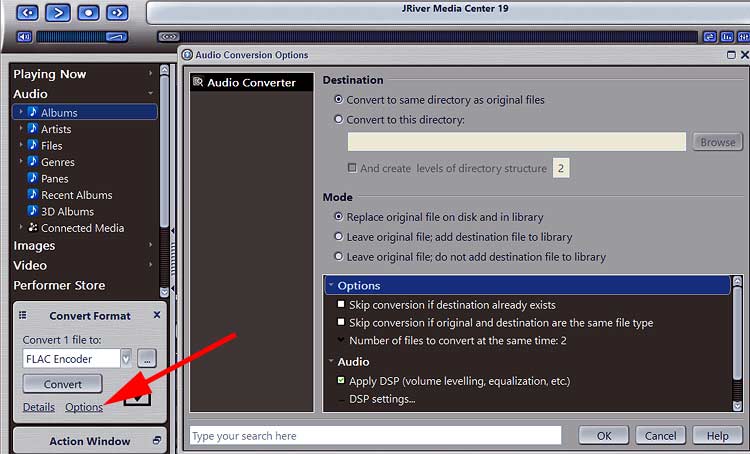
Probably not a bad idea to empty your Recycle Bin first. With the options selected, jRiver converts each file, then automatically sends the original version to the Recycle Bin. I'd also recommend having a good backup of your WAV files, just in case something goes horribly wrong. Your call there, as jRiver has a pretty trusty conversion process - I did the same thing for all my WMA lossless files way back in the day.
Once all your files are converted, you can do the same thing to select all files for the ANALYZE tool.
You MAY also have to do the same thing to select all files, then LIBRARY TOOLS/LOOKUP TRACK INFO FROM ONLINE DATABASE if your having problems with tags as mentioned. Not sure if jRiver does this automatically, but make sure you're online when you do the conversion, just in case. Files with good tags SHOULD be automatically skipped, but don't quote me on that. When I did my conversion, all I had was the album, artist, and track name to work with.
PS ... depending on the size of your collection AND the speed of your computer, this could take a while ...
Probably not a bad idea to empty your Recycle Bin first. With the options selected, jRiver converts each file, then automatically sends the original version to the Recycle Bin. I'd also recommend having a good backup of your WAV files, just in case something goes horribly wrong. Your call there, as jRiver has a pretty trusty conversion process - I did the same thing for all my WMA lossless files way back in the day.
Once all your files are converted, you can do the same thing to select all files for the ANALYZE tool.
You MAY also have to do the same thing to select all files, then LIBRARY TOOLS/LOOKUP TRACK INFO FROM ONLINE DATABASE if your having problems with tags as mentioned. Not sure if jRiver does this automatically, but make sure you're online when you do the conversion, just in case. Files with good tags SHOULD be automatically skipped, but don't quote me on that. When I did my conversion, all I had was the album, artist, and track name to work with.
PS ... depending on the size of your collection AND the speed of your computer, this could take a while ...
Last edited:


