

You are using an out of date browser. It may not display this or other websites correctly.
You should upgrade or use an alternative browser.
You should upgrade or use an alternative browser.
Tube tester: Sencore MU-150
- Thread starter Brice
- Start date
-
- Tags
- mu-150 sencore tube tester
Fred_Stone
New Member
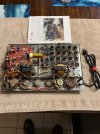
where did you set the pots? I assume you installed new onesHere is my almost completed MU150 main board. I am waiting for a side mounted tube socket that is currently in USPS Neverland. But I expect it will be delivered over the next week. Thank you, Brice, for making this replacement circuit board available to us! And thank all of you who helped contribute to this project!
View attachment 3141252
Fred_Stone
New Member
could someone tell me the measurements of the board? I downloaded the gerber file but all the site what the board size and the viewer I used dont show the size in mm
also who did you use to manufacture the board
thanks
and a big thanks too Brice for doing this
also who did you use to manufacture the board
thanks
and a big thanks too Brice for doing this
Last edited:
Fred_Stone
New Member
I got my boards today. thanks for posting the files. As you can see I went with purple.
Fred_Stone
New Member
| @Brice the neon bulb 606-A2B is unavailable and I was wondering if this would work in its place https://www.mouser.com/ProductDetail/VCC/A1A?qs=rHu0DOexXLD2XDJrE%2BAsOw== |
I have my main circuit board installed, but I am being careful about moving forward. I used all of the BOMs attached to this thread and I carefully purchased all the listed parts. Once I assembled the main circuit board, I had several leftover components. I did know that some of the tester's original external capacitors were added to Brice's board. I did remove that three wire capacitor. However, it was not clear which remaining external components are now on the circuit board, and which have to be replaced outside of the circuit board. So I am having to study the circuit diagram, cross off which components are mounted on the circuit board, and then I will have to locate any remaining components in the tester and replace them. If anyone has a diagram of the the external component locations, that would be really helpful. This may have been provided somewhere in this thread, but I may have missed it.
Also, I found that the Sencore instructions for fine tuning the circuit board seem to skip some steps. For instance, when adjusting for emissions, the instructions say to place the function switch in the Shorts position, but it skips over the step for selecting the Emissions test when making the adjustments. This is the same for the GM tuning process. Some of you experienced guys may snicker when I say this, but as someone who has to develop processes and documentation for complex IT systems, I tend to follow instructions very literally. I also write my instructions as completely as possible because I never know who may be coming behind me to follow a process I established. I make these comments only as an observation and not as a criticism. If I can get my Sencore MU150 up and running again accurately, I will try to fill in any missing gaps with my own notes.
One other thing I have in mind is to replace the analog meter with a digital panel mount meter. I will design a plate to go over the space the existing meter occupies, and mount the DPM within that. If this works, I will share my process here.
Thanks again for making this wonderful test device useful again!
Also, I found that the Sencore instructions for fine tuning the circuit board seem to skip some steps. For instance, when adjusting for emissions, the instructions say to place the function switch in the Shorts position, but it skips over the step for selecting the Emissions test when making the adjustments. This is the same for the GM tuning process. Some of you experienced guys may snicker when I say this, but as someone who has to develop processes and documentation for complex IT systems, I tend to follow instructions very literally. I also write my instructions as completely as possible because I never know who may be coming behind me to follow a process I established. I make these comments only as an observation and not as a criticism. If I can get my Sencore MU150 up and running again accurately, I will try to fill in any missing gaps with my own notes.
One other thing I have in mind is to replace the analog meter with a digital panel mount meter. I will design a plate to go over the space the existing meter occupies, and mount the DPM within that. If this works, I will share my process here.
Thanks again for making this wonderful test device useful again!
Last edited:
Fred_Stone
New Member
thanks for the replyNE-2 90VDC. Should work yes. This is what I used.
I am able to the Emissions calibration with no problem, once I figured I needed to move the Function switch to the Gm - Emissions position. However, I am getting absolutely nowhere with the Gm calibration. Do I have to leave the Emissions calibration module in place when I attempt to do the Gm calibration? Does the Gm Test button have to be depressed while doing the calibration? Does the B Load selector need to be moved into one of the Gm Settings positions (K, L, or M)? I have attempted all these things to no avail, and I have adjusted R24 through its entire range. R22 is a fixed 220 ohm resistor. My 1.6K resistor is only 1/4 watt. Here are the steps I am doing. Please let me know what I am doing incorrectly.
Assuming the Gm calibration is done by going straight from the Emissions test to the Gm test, the calibration module is still in Socket 1 and C Grid is still set to 3...
1. With the Function switch set to OFF, connect a 1.6K resistor between the F Signal wiper (connected to the lead of the 0.1 uF capacitor that connects both pots) and the CAL point on the board (connected to the right lead of R2).
2. Set B Load to A and the F Signal to 100. Set the Function switch to Shorts and allow the 12au7 to warm up.
3. I assume the Function switch is now set to Gm - Emissions.
This is where I get lost as adjusting R24 throughout its range does nothing. The meter never deflects in either direction.
My Emissions calibration module is made of only two components, a 1K resistor that is soldered on one side to Pin 3 of the module. The other end of the resistor is soldered to the anode of a 1N4007 diode, and the cathode of the diode is soldered into Pin1 of the module.
If anyone could help me perform the Gm calibration correctly, I sure would appreciate it!
Assuming the Gm calibration is done by going straight from the Emissions test to the Gm test, the calibration module is still in Socket 1 and C Grid is still set to 3...
1. With the Function switch set to OFF, connect a 1.6K resistor between the F Signal wiper (connected to the lead of the 0.1 uF capacitor that connects both pots) and the CAL point on the board (connected to the right lead of R2).
2. Set B Load to A and the F Signal to 100. Set the Function switch to Shorts and allow the 12au7 to warm up.
3. I assume the Function switch is now set to Gm - Emissions.
This is where I get lost as adjusting R24 throughout its range does nothing. The meter never deflects in either direction.
My Emissions calibration module is made of only two components, a 1K resistor that is soldered on one side to Pin 3 of the module. The other end of the resistor is soldered to the anode of a 1N4007 diode, and the cathode of the diode is soldered into Pin1 of the module.
If anyone could help me perform the Gm calibration correctly, I sure would appreciate it!

Jay,
This is from my notes.
Here is my 10 steps GM calibration procedure.
CALIBRATION (After the Emission Calibration 60 is properly done).
1) Set a sensitive voltmeter to AC.
2) Set the FUNCTION switch to SHORT, this power on the tester and warm up the 12AU7.
3) Add the 1.6k resistance between the wiper of SIGNAL F pot and the Cal point on the board.
4) Set the B LOAD pot to position A.
5) Set the SIGNAL F to maximum 100.
6) Adjust R24 to reach 100%. Sometimes you need to adjust R22 for fine tuning so you're
not at the edge of R24 (if made adjustable during the PCB build).
7) Measure the AC voltage at the SIGNAL wiper and ground on the PCB: I read 0.722VAC.
8) Set the SIGNAL F to minimum (0) position.
9) Disconnect the 1.6K resistor.
10) Measure the AC voltage at the SIGNAL wiper and ground on the PCB and adjust R21
1/100 of the previous voltage, in my case 7.2mV.
That's it. If you have a scope you can do it like this too: you just have to have 1/00 of the signal amplitude at the end. Same principle but just visual.
This is from my notes.
Here is my 10 steps GM calibration procedure.
CALIBRATION (After the Emission Calibration 60 is properly done).
1) Set a sensitive voltmeter to AC.
2) Set the FUNCTION switch to SHORT, this power on the tester and warm up the 12AU7.
3) Add the 1.6k resistance between the wiper of SIGNAL F pot and the Cal point on the board.
4) Set the B LOAD pot to position A.
5) Set the SIGNAL F to maximum 100.
6) Adjust R24 to reach 100%. Sometimes you need to adjust R22 for fine tuning so you're
not at the edge of R24 (if made adjustable during the PCB build).
7) Measure the AC voltage at the SIGNAL wiper and ground on the PCB: I read 0.722VAC.
8) Set the SIGNAL F to minimum (0) position.
9) Disconnect the 1.6K resistor.
10) Measure the AC voltage at the SIGNAL wiper and ground on the PCB and adjust R21
1/100 of the previous voltage, in my case 7.2mV.
That's it. If you have a scope you can do it like this too: you just have to have 1/00 of the signal amplitude at the end. Same principle but just visual.
I did what you suggested, and found my TR1 transistor was dead. I replaced it and I was almost able to get the meter adjusted to 100% on the first part of the Gm calibration. Using a Fluke 3000 FC DVM, I was able to see a high reading of 0.93 VAC. Once I removed the 1.6K resistor and set the F Signal to zero, I was not able to adjust R21 to go from 0.024 to 0.026 VAC. So I have a little more work to do.I would trace the square signal from the the oscillator to the tube grid.
ETA : I put an oscilloscope in place of my Fluke, and I was able to adjust for the low setting.
Last edited:

Now that I have a working and calibrated MU150, I was able to complete what I had in mind and I replaced the analog meter with a digital ammeter. I was able to recalibrate the tester using the new meter, and since the original meter was fairly accurate, I did not have to make any major adjustments. 833 on the digital meter is equivalent to 100 on the original meter. I am very pleased with the results! I do need to make a slight modification to the screw hole placements on the panel I made to hold the new meter.

Fred_Stone
New Member
how did you make the meter panel?