I've 3D printed a lot of things for equipment. Capacitor adapters for original clamps, spacers, washers, a replacement base for old h/k red power buttons (working on full replacement version), LED mounting blocks, a guide lever/ball for a JVC turntable weight, and more. It's been a phenomenal time saver as well as a money saver from anyone who has priced out things at a hardware store lately, and a lot


You are using an out of date browser. It may not display this or other websites correctly.
You should upgrade or use an alternative browser.
You should upgrade or use an alternative browser.
Who here on AK is using 3D printed parts?
- Thread starter dlucy
- Start date

mrehorst
Super Member
Do you want to replace the screw terminals with something like binding posts?
Projects like this always start with making a model of the parts that will physically interface with the new parts. That means modeling the back of the receiver in the vicinity of the new part location, including the hole in the back plate that will accept the new parts. You may also have to model stuff inside the chassis if it looks like it might interfere with the new part installation. Get a decent caliper to make measurements. Most 3D printers and slicing software use metric units, so do yourself a favor and start making the mental switch now. Make your measurements in mm. Once that's done, pick out the new hardware (binding posts or whatever) and model it/them in the same CAD file. Position those parts in relation to the model of the back of the receiver, then create the printed plastic part that will fit them together.
You don't have to model every detail of every part! Only as much as will be critical to the installation of new parts. Screws don't have to have threads- just a cylinder the diameter of the screw is usually adequate.
Binding posts often take up more space than screw terminals, so you may find that you can't fit them into the chassis as a replacement for the screw terminals. In that case you can make an adapter that sits between the screw terminals and the binding posts and connects with short wires to the original screw terminals.
This will of course require that you develop some CAD skills. But those skills will be extremely valuable because you have a 3D printer. Once you get a few projects under your belt you'll start thinking of all sorts of things you can do with that printer that don't involve starwars junk or tugboats. And FFS, learn to print in some material besides PLA! PLA sucks. PETG and ABS are both good alternatives.
Fusion360 is good CAD for 3D printing, and there's a free version that will do 10x what you will ever require, but it has a bit of a learning curve. OnShape is similar. You could try DesignSpark Mechanical- very easy to learn and use, and will do 99% of anything you'll ever want to do. Also free. A lot of people start with SketchUp. Unless it has changed in the last few years, I'd avoid it. It's intended for architectural modeling, not mechanical modeling, and tends to produce nonmainfold stl files that require repair before they can be printed.
Projects like this always start with making a model of the parts that will physically interface with the new parts. That means modeling the back of the receiver in the vicinity of the new part location, including the hole in the back plate that will accept the new parts. You may also have to model stuff inside the chassis if it looks like it might interfere with the new part installation. Get a decent caliper to make measurements. Most 3D printers and slicing software use metric units, so do yourself a favor and start making the mental switch now. Make your measurements in mm. Once that's done, pick out the new hardware (binding posts or whatever) and model it/them in the same CAD file. Position those parts in relation to the model of the back of the receiver, then create the printed plastic part that will fit them together.
You don't have to model every detail of every part! Only as much as will be critical to the installation of new parts. Screws don't have to have threads- just a cylinder the diameter of the screw is usually adequate.
Binding posts often take up more space than screw terminals, so you may find that you can't fit them into the chassis as a replacement for the screw terminals. In that case you can make an adapter that sits between the screw terminals and the binding posts and connects with short wires to the original screw terminals.
This will of course require that you develop some CAD skills. But those skills will be extremely valuable because you have a 3D printer. Once you get a few projects under your belt you'll start thinking of all sorts of things you can do with that printer that don't involve starwars junk or tugboats. And FFS, learn to print in some material besides PLA! PLA sucks. PETG and ABS are both good alternatives.
Fusion360 is good CAD for 3D printing, and there's a free version that will do 10x what you will ever require, but it has a bit of a learning curve. OnShape is similar. You could try DesignSpark Mechanical- very easy to learn and use, and will do 99% of anything you'll ever want to do. Also free. A lot of people start with SketchUp. Unless it has changed in the last few years, I'd avoid it. It's intended for architectural modeling, not mechanical modeling, and tends to produce nonmainfold stl files that require repair before they can be printed.
Last edited:

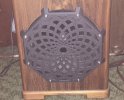
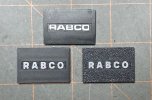

For my 630 I used a Sansui plate and scaled it to fit, I also doubled the thickness to 4mm. It took a couple of tries to zero in the width but it worked great.Would anyone happen to have a file to make some speaker terminals I can do for more HK930? Looking to upgrade them I do have a 3D printer.
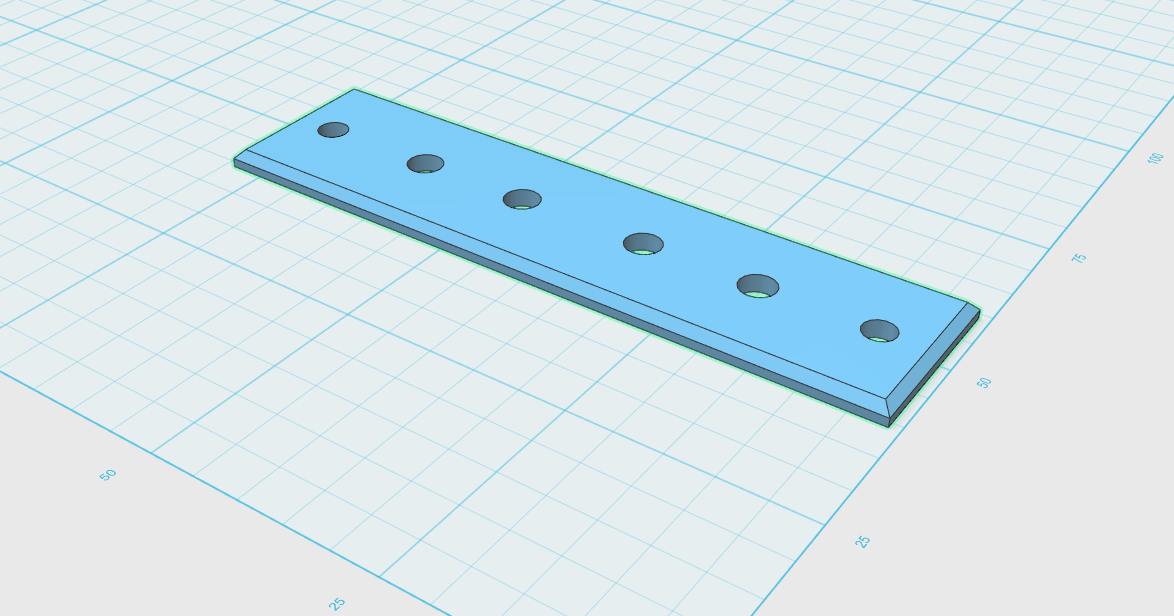
Sansui 210 Speaker Terminal plate by AWMCGOWAN | Download free STL model | Printables.com
Speaker terminal plate for Sansui 210 receiver. | Download free 3D printable STL models
www.printables.com
Finding small binding posts is hard, I used these: https://www.aliexpress.us/item/3256...p_id=20251215184702243975754596600002617312_2
Last edited:
It is on thingiverse I believeAnybody have a 3d file for an AM antenna ball mount? Sansui 9090db specifically, though another ball mount adapter file could be modified.
Last edited:
mrehorst
Super Member
I just got a Bambu Lab H2C printer. I needed a machine that I could use to print more detailed parts than my big printer.
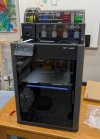
I have only run a couple test prints so far and they look great. Anyone who thinks Chinese manufacturing and software are second rate needs to see this thing.
I have only run a couple test prints so far and they look great. Anyone who thinks Chinese manufacturing and software are second rate needs to see this thing.

I don't design, just print but if I have to get something custom, I ask my kids to design it for me. The 3D printer has been in use few times a week for few years we had it. Not sure if it saved me money but it is very convenient to have the ability to print something vs ordering and waiting for the package to arrive.
mrehorst
Super Member
A 3D printer is an enabling technology. Once you learn a little CAD you can find all sorts of uses for a printer beyond printing starwars toys and tugboats. I run into problems almost daily that I can use the printer to solve.
See: Who here on AK is using 3D printed parts?
See: Who here on AK is using 3D printed parts?

Here is a 3d printable compactron (duodecar) pin straightener I made. I finally built the compactron test fixture for my Roetest and needed to test a bunch of Compactrons, many of which had bent pins.
Actually, Grok pretty much made the whole thing, and it was nearly perfect on the first try. I requested it in openSCAD format which is all text based code and grok (and likely other AI systems) seem to do a really good job at it.
It could be modded for 7 and 9 pin as well, but I'm pretty sure someone else already made those. Compactrons aren't very popular though.
Actually, Grok pretty much made the whole thing, and it was nearly perfect on the first try. I requested it in openSCAD format which is all text based code and grok (and likely other AI systems) seem to do a really good job at it.
It could be modded for 7 and 9 pin as well, but I'm pretty sure someone else already made those. Compactrons aren't very popular though.
mrehorst
Super Member
I printed a comb for the sand in my coffee table to test the multicolor capability of the H2C printer:

I haven't printed much yet, but so far I'm very happy with the machine's performance. It isn't particularly fast, at least when printing multiple colors, but quality is great!
I haven't printed much yet, but so far I'm very happy with the machine's performance. It isn't particularly fast, at least when printing multiple colors, but quality is great!

Do you have a video posted somewhere of it drawing in the sand? Very neat.
mrehorst
Super Member
I used wheeled carriages for the Y axis in the mechanism of this table and have been having problems keeping it running quietly. A previous table used sliding UHMW bearings and it has been extremely reliable and quiet for about 3 years. I am considering converting the newer table to sliding bearings.
The table is driven by servomotors and can run up to 2000 mm/sec with 2-3gs acceleration, but it tends to throw the sand when it runs over 1000 mm/sec.
The table is driven by servomotors and can run up to 2000 mm/sec with 2-3gs acceleration, but it tends to throw the sand when it runs over 1000 mm/sec.
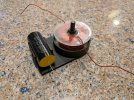
Here is an example - a crossover plate that my kid designed for me.I don't design, just print but if I have to get something custom, I ask my kids to design it for me. The 3D printer has been in use few times a week for few years we had it. Not sure if it saved me money but it is very convenient to have the ability to print something vs ordering and waiting for the package to arrive.

mrehorst
Super Member
"A" for effort, but I probably would have just drilled some holes in a piece of thin wood or plastic and used zip ties to hold the parts in place. 3D prints are weakest when you apply forces that will cause the layers to separate. The forces that are being applied to the printed cap bracket and screw through the center of the inductor are in that weakest direction. 3D prints/printers are great, but not for everything.
edit: actually the cap bracket looks OK...
edit: actually the cap bracket looks OK...
Last edited:
Well, the shaft (screw) that holds the inductor is not moving or going to break because of the cup where the inductor sits. This whole thing is very sturdy. The capacitor is held by two zip ties (not pictured) and not going anywhere neither. I will most likely drill a few holes and secure the plate to the speaker with screws so I can remove if necessary. I have printed tons of parts including lots for my RC cars and while some do break (RC parts do get abused) most of them hold up just fine."A" for effort, but I probably would have just drilled some holes in a piece of thin wood or plastic and used zip ties to hold the parts in place. 3D prints are weakest when you apply forces that will cause the layers to separate. The forces that are being applied to the printed cap bracket and screw through the center of the inductor are in that weakest direction. 3D prints/printers are great, but not for everything.
edit: actually the cap bracket looks OK...

You can 3d print things in materials like Nylon, carbon fiber reinforced filaments, etc, and there are other tough resins for SLA printers that could be up to the task. They are often harder to work with and need a higher end machine and experience than a regular cheap consumer 3d printer... but not a commercial grade unit.I don't do any 3D printing but I have read posts about printing Turntable parts. Quite a few years back it seemed there was problems printing gears that were hard enough to work properly. Have problems like that been sorted out now?